Mobile PDF workspace for editing, scanning, signing on Android
PaperFlow: PDF Reader & Editor scans documents, merges and splits PDFs, and adds signatures in one mobile workflow. BROCCOLI SOCIETY LLC builds this Android utility to process files locally for privacy and speed. The app pairs document scanning with compression, conversion to images, and metadata removal for secure sharing. Students, freelancers, and office workers who need on-device editing and quick page-level changes will find practical value in the tool.
What does PaperFlow actually do for document workflows?
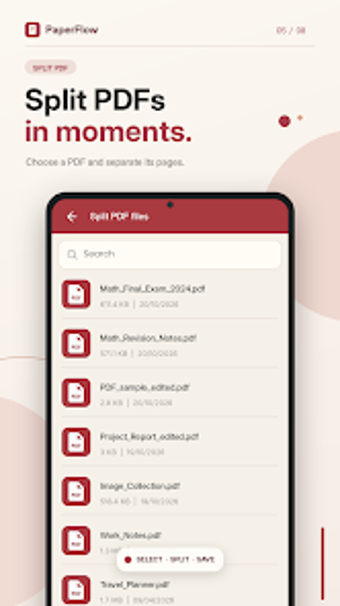
PaperFlow opens a device camera scanner, applies smart auto-crop, and produces editable PDF pages that you can reorder, rotate, or delete. The app includes merge and split functions, watermarking, page numbering, and a conversion engine that exports pages as images or builds PDFs from photos. These operations run entirely on the device, so scanning, compressing, and signature embedding happen without an internet connection.
Does it slow down your device while processing documents?
Processing occurs locally; the app is designed for modern Android devices and handles tasks like compression and conversion on-device. That means CPU and memory usage depend on device specs during large merges or high-resolution conversions. For typical single-document edits and signature placement, the workload remains scoped to the app rather than background system services, keeping other apps responsive on mid-range hardware.
Is PaperFlow safe to use with sensitive files?
The app offers password protection for PDFs and a metadata removal tool, and it states that all processing takes place on the device. Those two facts provide concrete safeguards: encrypted output via passwords and reduced embedded data through metadata stripping. The inclusion of an on-device workflow removes the need to upload documents to external servers for the covered features.
Do users need technical knowledge to operate the app effectively?
Most common tasks use guided, single-action controls: scan, crop, add a signature, then save or export. Advanced operations such as batch merging, grayscale conversion, or PDF repair are available but optional. Casual users can perform scanning and signing with no specialist knowledge; users who need page-level control can access more detailed tools without needing system-level expertise.
Clear option for mobile-first PDF editing with on-device privacy
PaperFlow suits Android users who want scanning, page management, and signing without uploading files, and it includes password protection and metadata removal. Expect device-dependent processing time for large files and a learning curve for advanced tools. Recommended for students and professionals needing portable, offline document handling.